
Ampr
Ampr
Ampr
A time tracker and invoice generator I built for myself, because none of the existing ones were doing what I needed without making me pay for it.
A time tracker and invoice generator I built for myself, because none of the existing ones were doing what I needed without making me pay for it.
Type
Personal project
Personal project
Platform
macOS desktop
macOS desktop
Stack
React, TypeScript, Electron, Tailwind
React, TypeScript, Electron, Tailwind
Why I Built It
Why I Built It
I freelance on the side, and I kept losing track of where my time actually went. I'd open Figma, jump to Linear, get pulled into Slack, end up reading something on Twitter, and somehow an entire day would pass without me knowing what I'd billed for.
I freelance on the side, and I kept losing track of where my time actually went. I'd open Figma, jump to Linear, get pulled into Slack, end up reading something on Twitter, and somehow an entire day would pass without me knowing what I'd billed for.
The annoying part is, there's no shortage of time tracker apps. I tried a bunch. Some of them tracked beautifully but had no way to generate an invoice at the end, so I'd still end up in a notion copying hours over manually. Some had really clunky UI that made the act of starting a timer feel like a chore. And the ones that actually did both things well were paid, and not casually priced either. A lot of them felt like enterprise tools being sold to a freelancer.
The annoying part is, there's no shortage of time tracker apps. I tried a bunch. Some of them tracked beautifully but had no way to generate an invoice at the end, so I'd still end up in a notion copying hours over manually. Some had really clunky UI that made the act of starting a timer feel like a chore. And the ones that actually did both things well were paid, and not casually priced either. A lot of them felt like enterprise tools being sold to a freelancer.
So I built my own. The rule was simple. I hit start when I sit down to work, and the app captures every detail until I stop it. I can rename sessions later if I want to. The whole thing turns into an invoice when I need it to. No surveillance, no subscription, no clunky export step.
So I built my own. The rule was simple. I hit start when I sit down to work, and the app captures every detail until I stop it. I can rename sessions later if I want to. The whole thing turns into an invoice when I need it to. No surveillance, no subscription, no clunky export step.
How It Works
How It Works
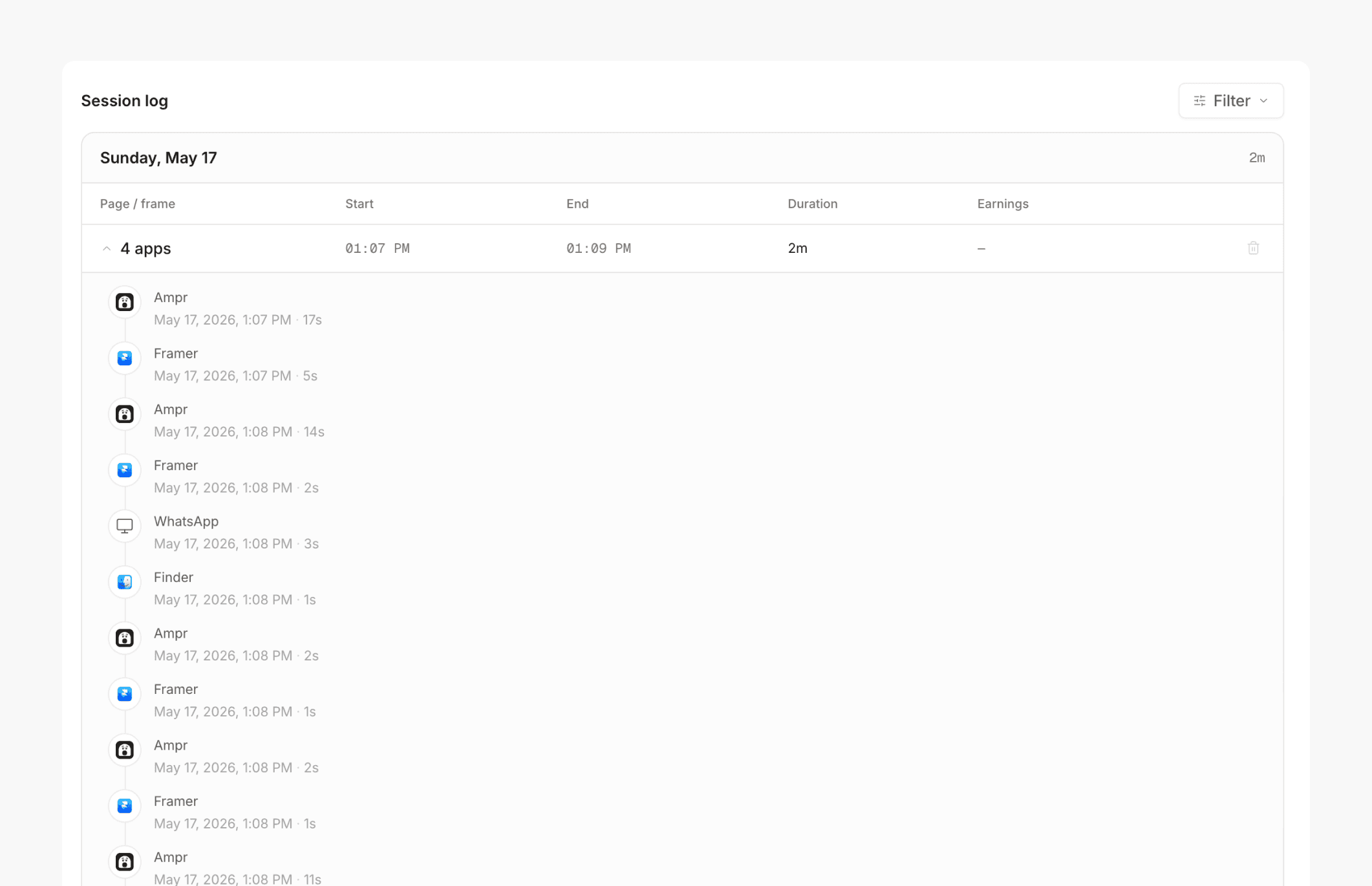
Ampr lives as a desktop app on my Mac. When I want to start tracking, I hit the counter manually. It asks for accessibility permission the first time, and from that point on it can see which app is in focus, for how long, and how often I switch between them.
Ampr lives as a desktop app on my Mac. When I want to start tracking, I hit the counter manually. It asks for accessibility permission the first time, and from that point on it can see which app is in focus, for how long, and how often I switch between them.
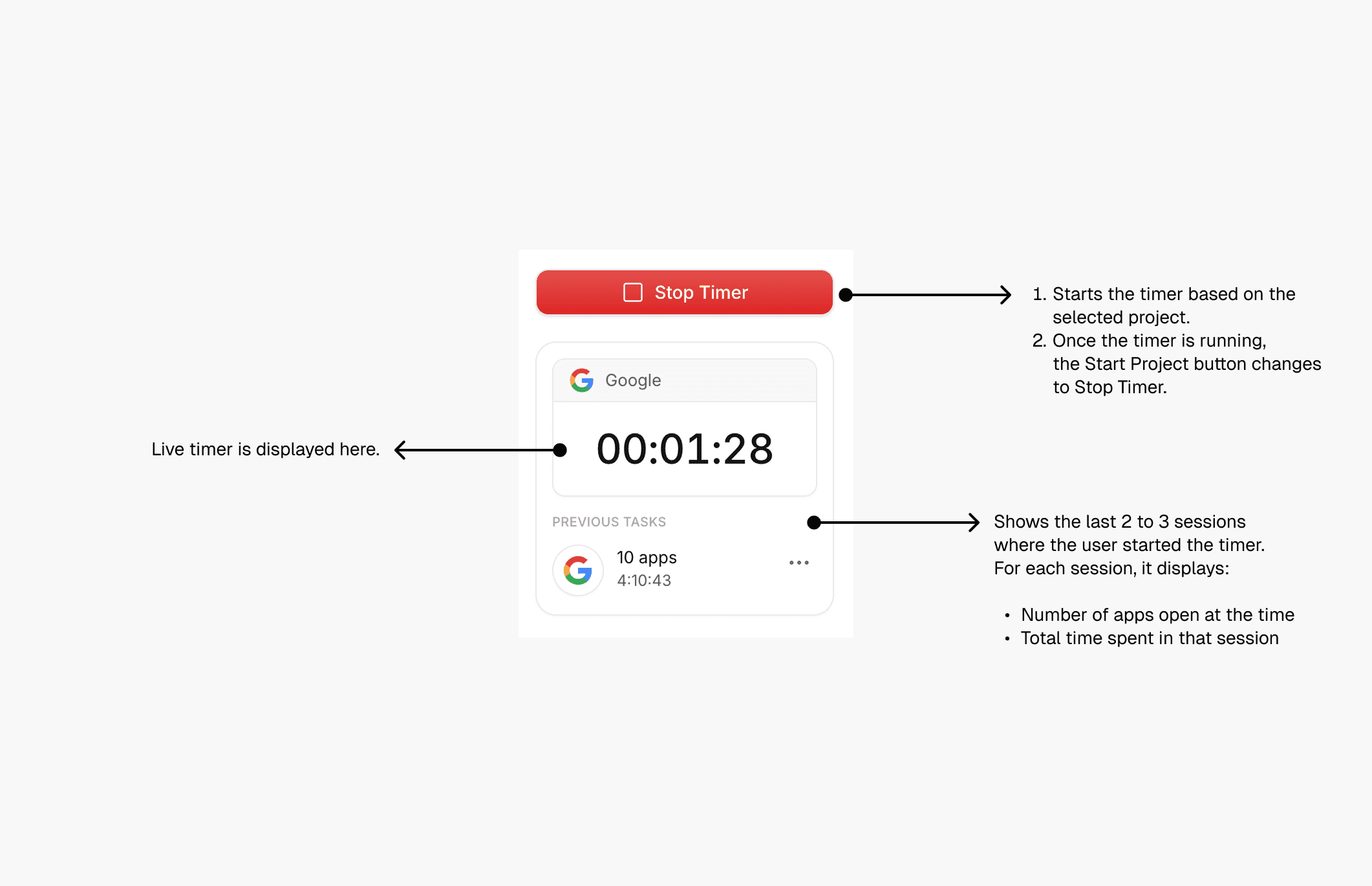
I kept the start manual on purpose. I didn't want a tool that watches me all day. I wanted one that captures everything in detail once I tell it I'm working. Start the counter when I sit down, stop it when I'm done. Between those two moments, ampr handles the rest.
I kept the start manual on purpose. I didn't want a tool that watches me all day. I wanted one that captures everything in detail once I tell it I'm working. Start the counter when I sit down, stop it when I'm done. Between those two moments, ampr handles the rest.
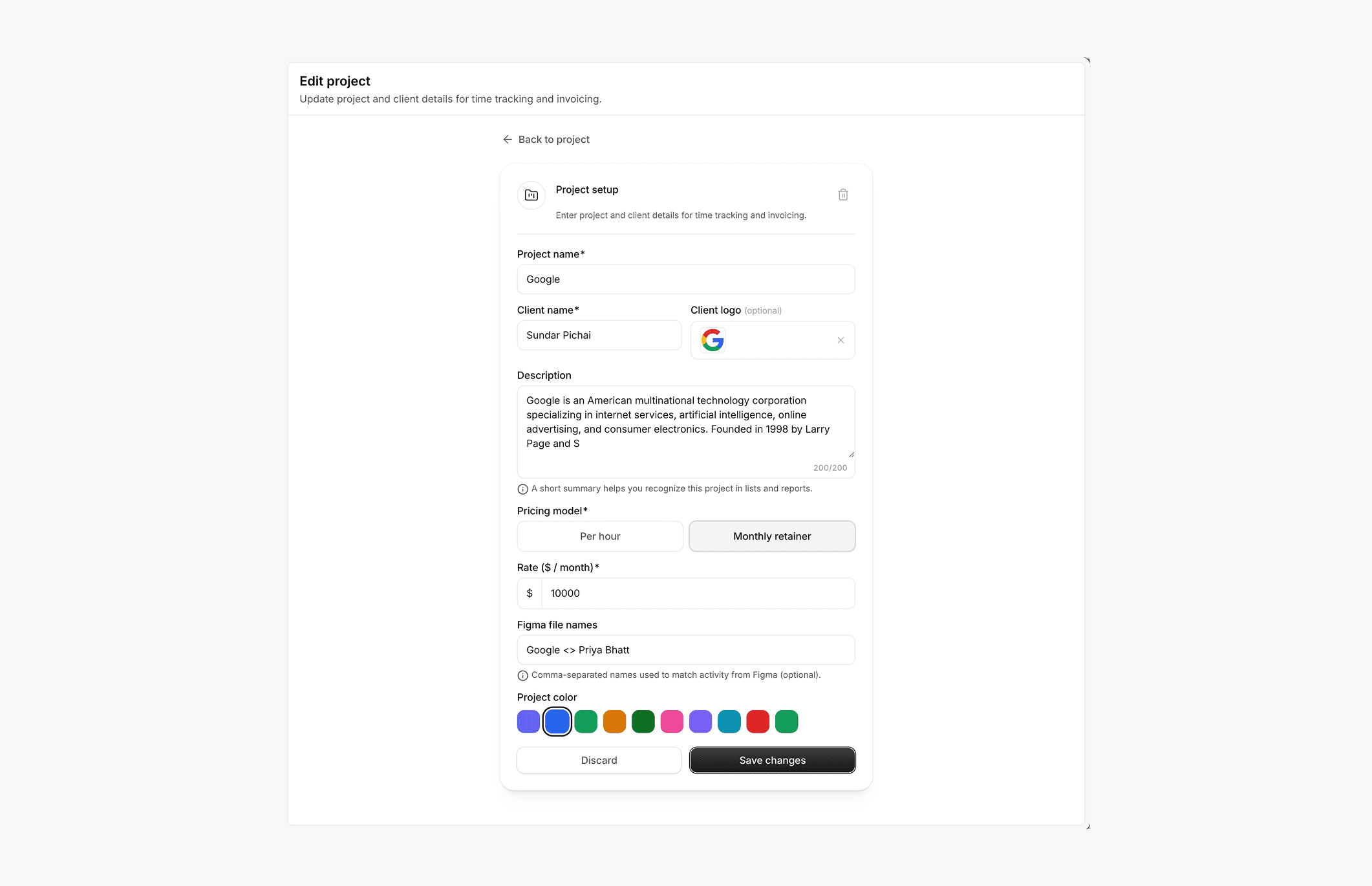
Every project I make has a name, a client, a logo, and a price. While the counter runs, ampr keeps track of the apps I'm using, the time I'm spending in each, and how many distinct apps I've touched in a single session. I can rename sessions in real time too. So if I'm halfway through redesigning a Google homepage, I can name that session right there, and it stays attached to the project.
Every project I make has a name, a client, a logo, and a price. While the counter runs, ampr keeps track of the apps I'm using, the time I'm spending in each, and how many distinct apps I've touched in a single session. I can rename sessions in real time too. So if I'm halfway through redesigning a Google homepage, I can name that session right there, and it stays attached to the project.
I can rename sessions in real time too. So if I'm halfway through redesigning a Google homepage, I can name that session right there, and it stays attached to the project. I can also delete individual tasks inside a session. Say I'm working on a project called "Narrio" and I get distracted, open Twitter or Instagram or YouTube, or maybe I just forgot to stop the timer when I was done. All of that gets captured by the tracker, but none of it is actually project work. So I go in and delete those tasks before generating the invoice, and the hours don't get counted. The session stays clean, the time stays honest.
I can rename sessions in real time too. So if I'm halfway through redesigning a Google homepage, I can name that session right there, and it stays attached to the project. I can also delete individual tasks inside a session. Say I'm working on a project called "Narrio" and I get distracted, open Twitter or Instagram or YouTube, or maybe I just forgot to stop the timer when I was done. All of that gets captured by the tracker, but none of it is actually project work. So I go in and delete those tasks before generating the invoice, and the hours don't get counted. The session stays clean, the time stays honest.
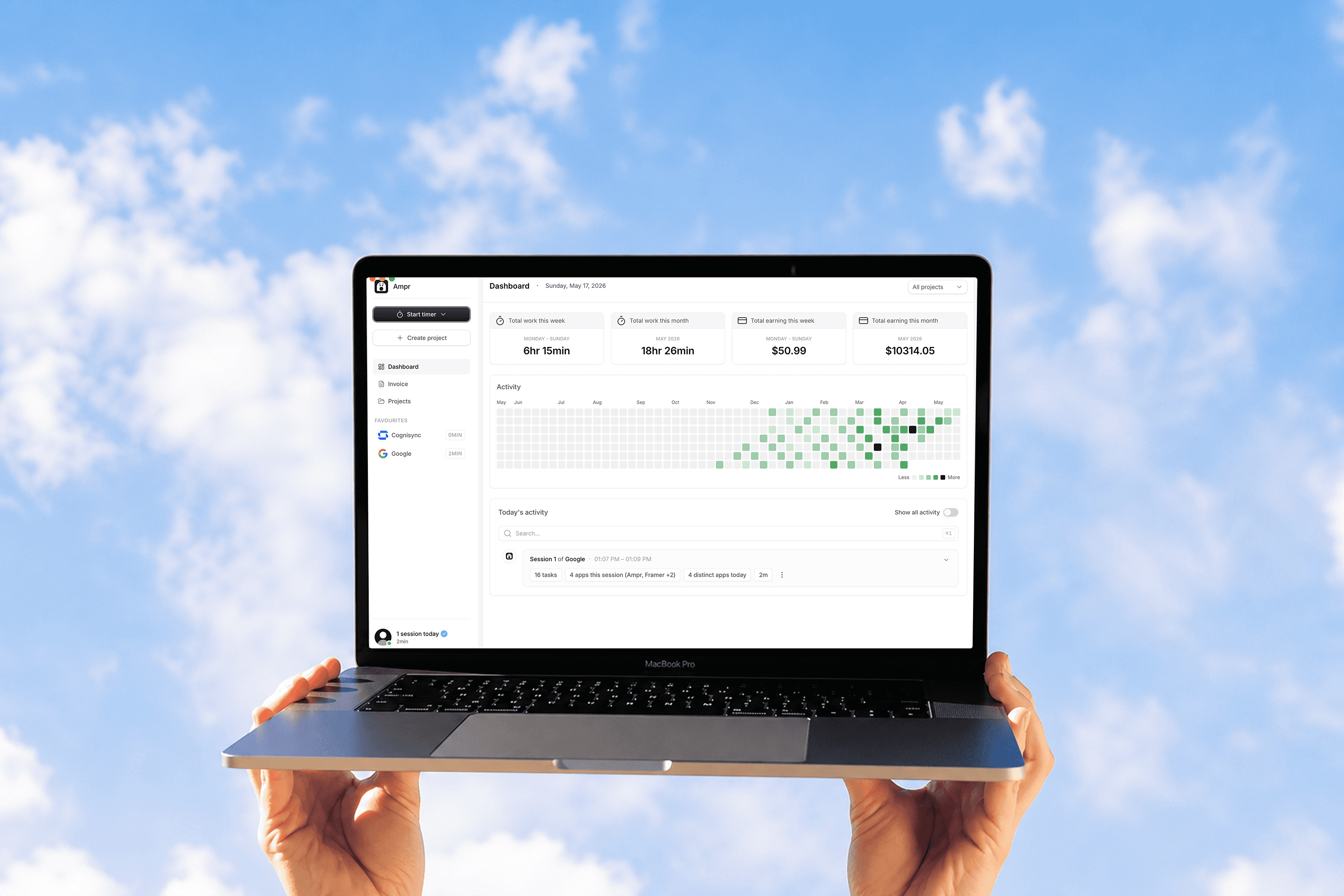
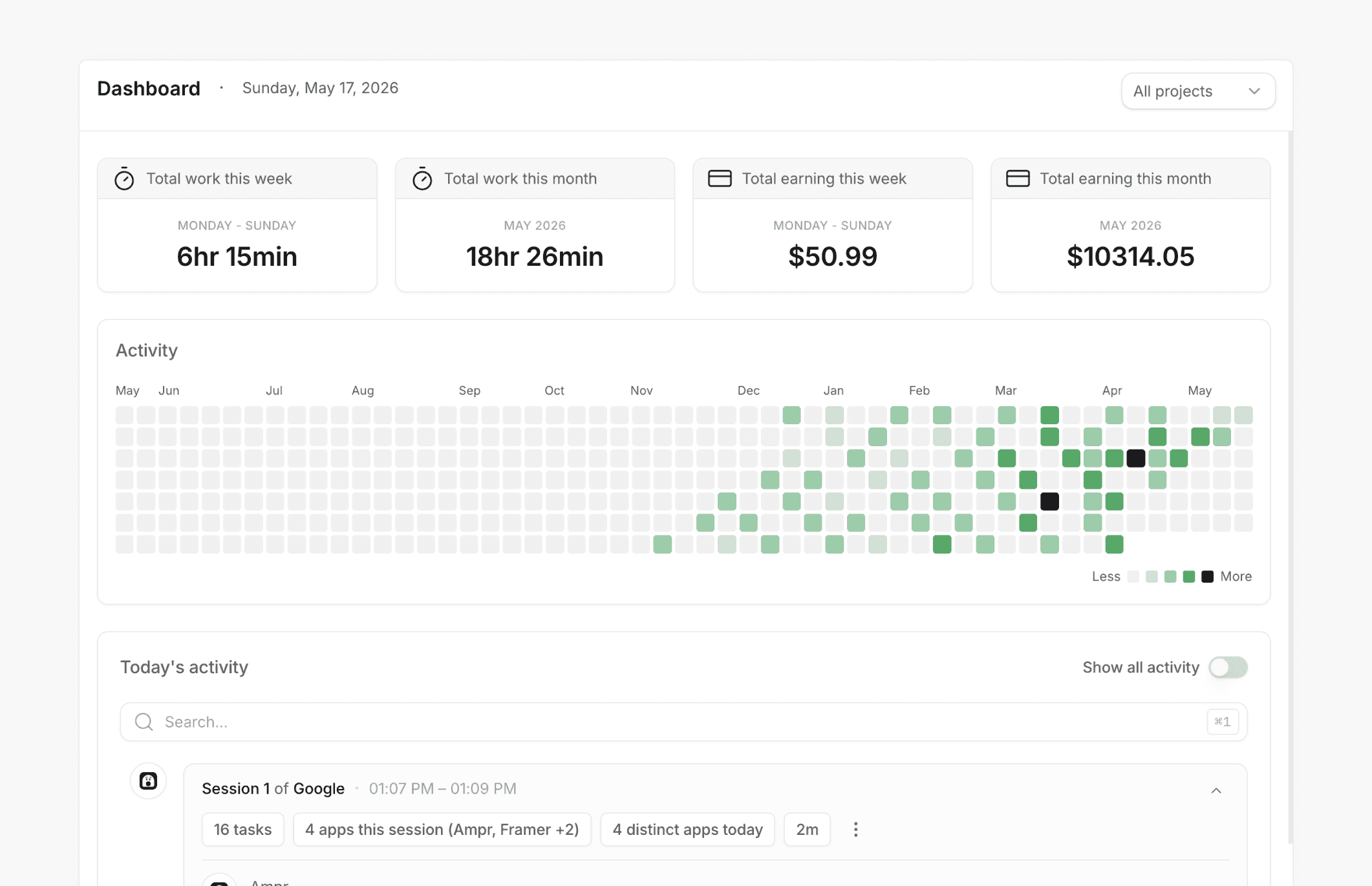
The dashboard shows the timeline expanded out, so I can see exactly what happened across a day. Summary cards at the top tell me how much I worked this week or month, how much I've earned, and a quick activity strip of what I've been doing. There's a card view and a table view, and I switch between them depending on what I'm trying to look at.
The dashboard shows the timeline expanded out, so I can see exactly what happened across a day. Summary cards at the top tell me how much I worked this week or month, how much I've earned, and a quick activity strip of what I've been doing. There's a card view and a table view, and I switch between them depending on what I'm trying to look at.
The Invoice Page
The Invoice Page
The whole point of tracking is what happens at the end. So the invoice page just pulls the tracked data for any project, multiplies it by the price I set, and gives me an invoice I can export and send to the client.
The whole point of tracking is what happens at the end. So the invoice page just pulls the tracked data for any project, multiplies it by the price I set, and gives me an invoice I can export and send to the client.
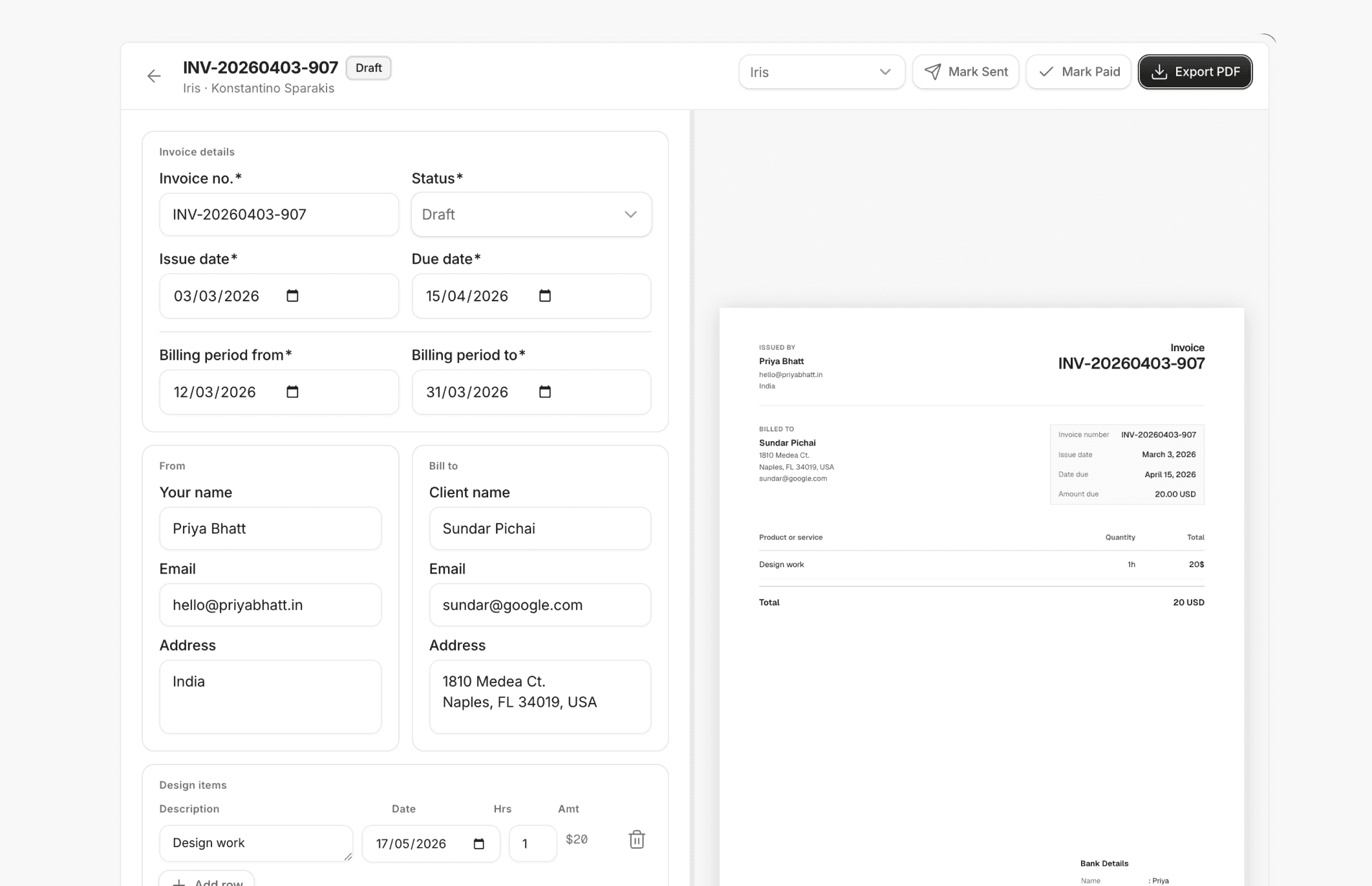
No spreadsheets. No copy-pasting hours from one app to another. The data goes from tracking to invoice in basically one step, which is the whole reason I built this in the first place.
No spreadsheets. No copy-pasting hours from one app to another. The data goes from tracking to invoice in basically one step, which is the whole reason I built this in the first place.
What I Learned Building It
What I Learned Building It
The biggest unlock was figuring out Electron. To build anything that actually runs as a real Mac app with menu bar access and accessibility permissions, I had to wrap the whole thing in Electron. It's the framework most modern desktop apps use, and it lets you write desktop apps using regular web tech like React and Tailwind.
The biggest unlock was figuring out Electron. To build anything that actually runs as a real Mac app with menu bar access and accessibility permissions, I had to wrap the whole thing in Electron. It's the framework most modern desktop apps use, and it lets you write desktop apps using regular web tech like React and Tailwind.
Once I got that the outer layer was Electron and everything inside could be regular web stuff, the project actually became buildable. I designed the UI like a normal web app and let Electron handle the native Mac side of things.
Once I got that the outer layer was Electron and everything inside could be regular web stuff, the project actually became buildable. I designed the UI like a normal web app and let Electron handle the native Mac side of things.
The other thing I learned is that vibe coding works really well for projects with a clear and narrow scope. I wasn't trying to build a SaaS for thousands of users. I was building a single-user tool I already knew how I wanted to use. That kind of project is exactly what AI-assisted coding is good at. You describe what you want, you iterate fast, and you ship something that solves your own problem.
The other thing I learned is that vibe coding works really well for projects with a clear and narrow scope. I wasn't trying to build a SaaS for thousands of users. I was building a single-user tool I already knew how I wanted to use. That kind of project is exactly what AI-assisted coding is good at. You describe what you want, you iterate fast, and you ship something that solves your own problem.
And honestly, the best part is that owning the tool means I can change it whenever. If I notice something missing on a Tuesday, I can add it that night. I'm not waiting on a product team to prioritise my use case. I'm not paying a subscription to use something I'd rather just build. This is the part most paid tools don't give you, and it's the main reason I'd rather maintain my own software for the stuff that's part of my daily workflow.
And honestly, the best part is that owning the tool means I can change it whenever. If I notice something missing on a Tuesday, I can add it that night. I'm not waiting on a product team to prioritise my use case. I'm not paying a subscription to use something I'd rather just build. This is the part most paid tools don't give you, and it's the main reason I'd rather maintain my own software for the stuff that's part of my daily workflow.
What's Next
What's Next
Right now I'm the only user, and that's fine. I use Ampr every day, and every time I notice something missing, I add it. A keyboard shortcut to start the counter. A better way to filter the timeline by project. Sharper invoice templates. Small stuff, but adding it is part of what makes the tool feel like mine.
Right now I'm the only user, and that's fine. I use Ampr every day, and every time I notice something missing, I add it. A keyboard shortcut to start the counter. A better way to filter the timeline by project. Sharper invoice templates. Small stuff, but adding it is part of what makes the tool feel like mine.